MxScan is gone. Your MailEnable server still needs a guard.
MEGuard is a free, open-source spam filter, quarantine, log viewer and intrusion shield for MailEnable on Windows. It takes over from MxScan, and works just as well on a server that never had it. It plugs into the MailEnable pickup event, keeps everything in one folder, and never loses a message.
MIT licence. Windows Server, MailEnable Standard and Professional, IIS or Apache.
Received: from mx.unknown ([192.0.2.68]) by mail.example.com with MailEnable ESMTPFrom: "Account Team" <security@acc0unt-verify.example>Subject: Urgent: verify your mailbox nowX-Spam-Status: Yes, score=15.9 BAYES_95 PHISH_ACCOUNTX-MEGuard-Status: quarantine; score=34.9
Made by a MailEnable admin who relied on MxScan for years
For a long time MxScan was the obvious spam add-on for MailEnable. It has not been updated for about a decade, licences can no longer be bought, and the unregistered version stamps a notice into every message.
MEGuard was written to replace it on real servers that serve municipalities, schools and small businesses, and it has been filtering their mail since November 2026. It keeps what admins used every day: the log viewer, SpamAssassin, and simple whitelist and blacklist management. It adds what was always missing: a modern web interface, a quarantine you release from with one click, brute-force protection, and a watchdog that restarts whatever stops.
Coming from MxScan? Your lists and keyword rules come along: MEGuard imports them and can run next to MxScan until you switch over. Never used MxScan? Skip the import. MEGuard starts with SpamAssassin's own rules and sensible defaults, and you build your lists as you go.
| You used in MxScan | In MEGuard |
|---|---|
| Log Viewer | Log page with search, mail per hour and a breakdown of every point a message got |
| SpamAssassin connector | SpamAssassin for Windows with a watchdog, daily rule updates and Bayes training |
| Whitelist and blacklist | Lists page with the same patterns, hit counters, and one-click entries from the log |
| Keyword content filter | Keyword rules in plain text or regular expressions, imported from MxScan |
| Junk tagging | Junk folder for low scores, quarantine for high ones |
| Not available | Attacks page, country filter, IPBan, health watchdog, daily backup |
Everything a MailEnable server needs, in one folder
MEGuard lives in C:\MEGuard with its own PHP, SpamAssassin and IPBan. Nothing is scattered across the server, and nothing needs Linux, a cloud account or a subscription.
Filtering
- Pickup event integration: no SMTP proxy, no MX changes
- SpamAssassin scoring, trained nightly on your own mail
- Whitelists and blacklists for senders, recipients and IPs
- Keyword rules that ignore case and accents
- DNS blocklists checked against the real client IP
- Repeat-sender block and an optional country score
Web interface
- Log with the reason behind every score
- Quarantine with one-click release and delete
- Attacks: failed logins and bans per protocol
- Resources: load, disks, queues and service restarts
- Light and dark mode, usable on a phone
- English and Hungarian, easy to translate
Protection
- IPBan preconfigured for SMTP, POP, IMAP and RDP
- Country filter for login ports on the Windows Firewall
- Health watchdog that restarts SpamAssassin and mail services
- Daily backup of the database and settings
- Password, IP lockout and hardened pages
- Fail-open: an error never blocks or loses mail
See it before you install it
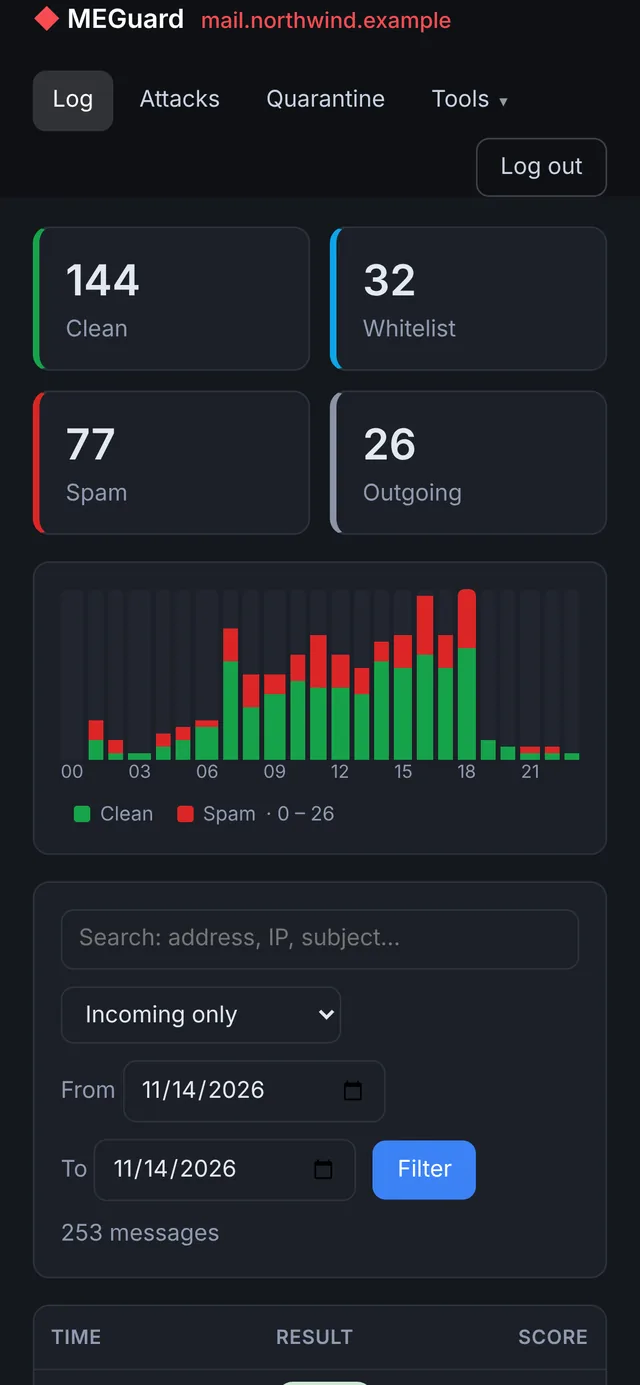
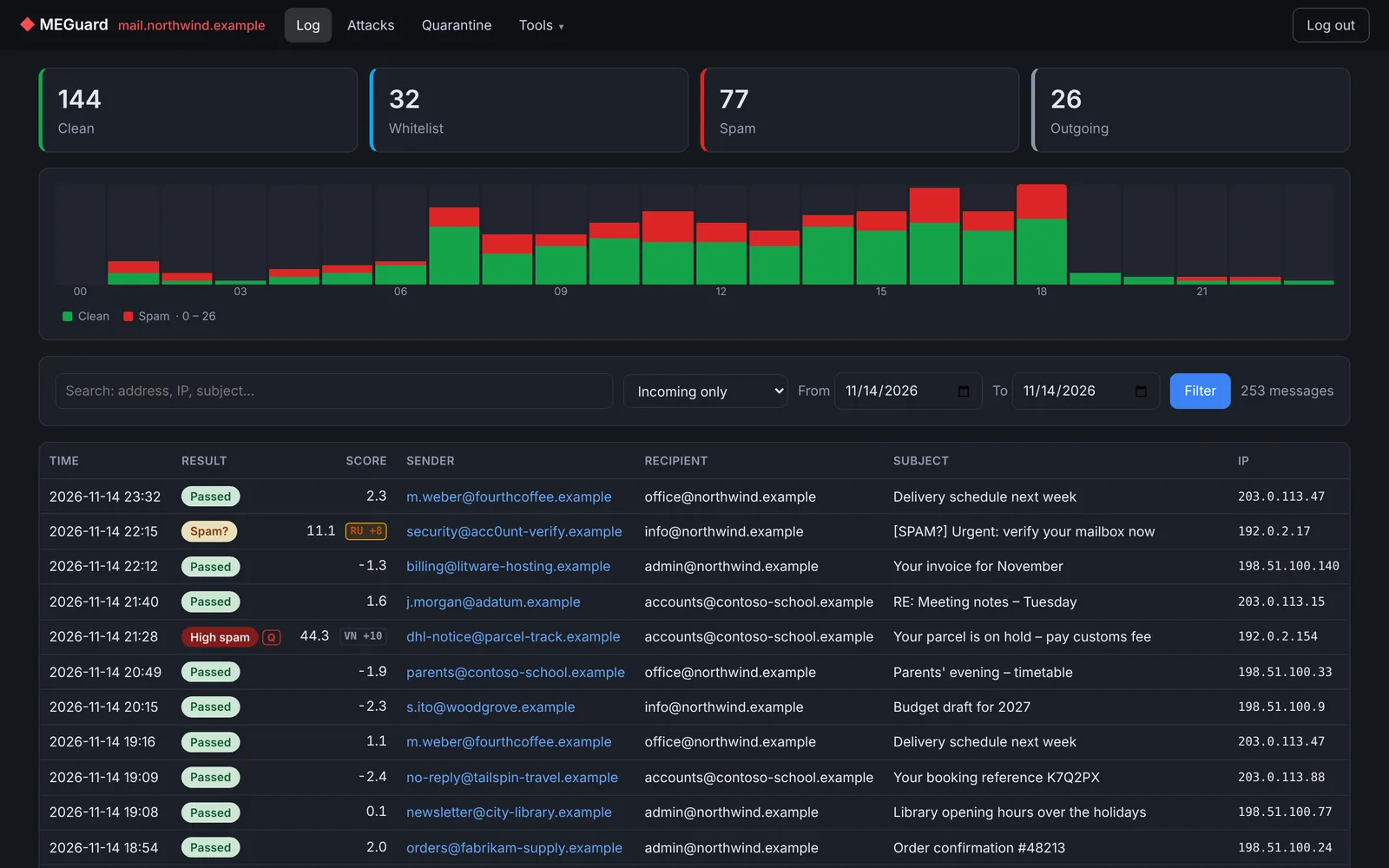
Screenshots from a demo server with made-up domains. Switch between pages, and between light and dark mode.
The same interface on a phone
What happens to an incoming message
MailEnable calls MEGuard for every message it receives, before delivery. The check usually takes well under two seconds.
MailEnable receives it
The SMTP connector accepts the message and the MTA picks it up from the inbound queue.
The pickup event calls MEGuard
C:\MEGuard\pickup.cmd gets the queue file and the message file.
MEGuard scores it
Lists first, then keyword rules, DNS blocklists, the sending server's country and SpamAssassin.
MailEnable delivers it
Where it goes depends on the score:
InboxJunk folderQuarantine
If anything goes wrong inside MEGuard – SpamAssassin has stopped, the database is locked, a bug – the message is delivered untouched and the error is logged. MEGuard is built so that it can never be the reason mail goes missing.
Install it in an afternoon, switch over in a minute
Every step is a script you run as administrator. Mail keeps flowing exactly as before until the last step, and going back is one field in MailEnable Administrator.
- Unzip to C:\MEGuard and copy config.sample.php to config.php. Check the MailEnable folder and set your time zone.
- Install the parts: MEGuard's own PHP, SpamAssassin, IPBan and the health watchdog, one script each.
- Import from MxScan (optional, only if you used it): your lists and keyword rules come along.
- Publish the web interface on IIS with one script, or with a few lines of Apache configuration.
- Run the check: tools\check.cmd tells you what is ready and what is not.
- Switch over: enter C:\MEGuard\pickup.cmd as the MTA pickup program.
rem as administrator, in C:\MEGuard
tools\install-spamd.cmd
tools\install-ipban.cmd
tools\install-health.cmd
tools\install-iis.cmd     rem own PHP, FastCGI, /meguard
tools\setpass.cmd
tools\check.cmd
rem as administrator, in C:\MEGuard
tools\install-php.cmd     rem only if your PHP is older than 8.1
tools\install-spamd.cmd
tools\install-ipban.cmd
tools\install-health.cmd
tools\setpass.cmd
tools\check.cmd

# httpd.conf, inside the https <VirtualHost>
Alias /meguard "C:/MEGuard/web"
<Directory "C:/MEGuard/web">
    Require all granted
</Directory>
The full guide, with every option and the MxScan import, is in INSTALL.md.
Questions admins ask first
Is it really free?
Yes. MEGuard is open source under the MIT License, with no paid edition and no licence keys. SpamAssassin for Windows (JAM Software) and IPBan (DigitalRuby) are free as well, also for commercial use.
Do I need Linux, Docker or a cloud service?
No. Everything runs on your Windows mail server, in C:\MEGuard. The only outside traffic is downloading updates (SpamAssassin rules, country lists) and the usual DNS blocklist lookups.
I never used MxScan. Do I need it?
No. The MxScan import is an optional step for people switching over. On a fresh MailEnable server you skip it: MEGuard scores mail with SpamAssassin's own, daily updated rules and the built-in defaults, and your whitelists and blacklists grow from the log with one click.
Can it run next to MxScan while I test?
Yes. SpamAssassin runs on its own port, the lists are imported from MxScan, and nothing changes until you point the MTA pickup event to MEGuard. You can also start in monitor mode, where MEGuard only scores and logs.
The web server on my mail server is IIS. Is that a problem?
No, that is the common case, because MailEnable's own web mail runs on IIS. tools\install-iis.cmd adds a /meguard application with MEGuard's own PHP through FastCGI, using only built-in Windows components. Your other sites and PHP versions are not touched.
MailEnable already has SpamAssassin and Bayesian filters. What about those?
MailEnable Professional can call SpamAssassin itself and has its own Bayesian filter (Extensions → Message Filter). Once MEGuard filters your mail, disable both, otherwise every message is judged twice and the decisions can contradict each other. If you already run SpamAssassin for MailEnable, MEGuard can use it instead of installing its own (INSTALL.md, step 4).
Does MEGuard scan for viruses?
Not yet – it is planned for version 0.4.0. MEGuard will check attachments before delivery with the Microsoft Defender engine built into Windows Server, quarantine infected messages, and block dangerous file types (.exe, .js, .iso, macro documents…) even without an antivirus engine. It will be optional. This matters most on MailEnable Standard, which has no antivirus filter of its own. Until then, keep MailEnable Professional's antivirus filter or your own antivirus product.
Which MailEnable editions are supported?
Standard and Professional are in daily use. Enterprise uses the same pickup event and should work, but has not been tested yet. Reports are welcome.
Who maintains MEGuard?
A MailEnable administrator who ran MxScan for many years and needed a replacement for his own servers. The code is written with AI assistance (Claude by Anthropic) and runs on production servers before each release. Bug reports and pull requests go to GitHub.
Get MEGuard
Releases, source code, changelog and issue tracker are on GitHub.